Showcase Daily Routines Visually with AI Video Maker
This post was created by CapCut
On social media platforms like TikTok and Instagram, the feeds are filled with so-called aesthetic routine videos. Millions are drawn to these brief videos of morning coffee routines, skincare routines, or daily exercise. They combine the art of storytelling and visuals in small bites. Even non-creators can get on this trend with the CapCut App. The app transforms your daily life into a skilled video with the help of the AI video maker. No previous video experience is required. You only need your phone and some minutes.
The Reason Daily Routine Videos are so popular
Routine videos are successful because viewers can easily identify with them. Viewers like to see real, unstaged productions. It is intimate and sincere. Viewers relate to your rhythm of life when you reveal it. Another benefit of these videos is that they motivate others to improve their habits. The emergence of habit-sharing on social media platforms is evidence that minor rituals, when presented attractively, can have a significant impact. Your morning schedule or night skincare routine is something other people would enjoy watching.
How to Organize Your Day with CapCut AI Templates
The CapCut App provides AI templates to help you shape your story. Templates such as “Create Story Video” and “Create Video with Scripts” will make it easy. All you have to do is post your clips and your theme. Divide your routine into understandable chunks- morning, working hours, and night routine. One section is a visual chapter. You are not obliged to shoot at a time. The template organizes the whole day without any hitch.
Improving the Routine Videos with the Visual Styles and Music
Choosing the appropriate mood is as simple as there are almost 30 visual styles in the CapCut App AI lab. Try the Dreamy Glow to achieve a relaxing nighttime skincare atmosphere. Select Cinematic and add a motivational boost to your productive morning. You will be able to create videos with inbuilt music or send your music. Every video has its rhythm that reflects your pace in reality. This makes the material more interesting. The visuals and sound will help your routine turn into a memorable story.

Including the Visual Aesthetics in the Routine Scenes
The CapCut App features AutoCut, which stitches your clips together to create a smooth video. There is no need to time the transitions or manually adjust the pace. AutoCut analyzes the clips and automatically constructs smooth transitions. Add filters, visual effects, or classy captions to continue the mood of your video. If you want to use soft transitions on calm scenes or complex transitions on active ones, it is also possible to do so using the editing tools. The video maintains a consistent aesthetic throughout.
AI Captions and Voiceovers Personalization
Personalized messages must be added to your video to make it unique. With the AI caption generator, you can provide the text that expresses your thoughts, tips, or reminders. You may want to incorporate inspirational quotations in your exercise section. Or tabulate the skincare products in your nighttime regimen. You can even tell the actions by auto voiceovers. Such additions help to make your video more informative and closer to readers. They also make your personality stand out.

Typical Video Ideas for Various Audiences
Various routines attract various viewers. As a student, you can give it a try with the so-called Study with feature, where your desk and attention-gaining strategies are recorded. Workday vlogs can also be recorded by professionals, displaying an inbox during the morning or a workstation decor. Parents may present morning school preparation or reading time in the evening. Health enthusiasts can use “Meal prep routine” or “Morning workouts.” Beauty enthusiasts can share their Night skincare tutorials. The CapCut App does all of this and makes it visually appealing with little effort. It’s as simple as that: you select a theme and let the tools do their work.
Turn Daily Moments into Engaging Clips
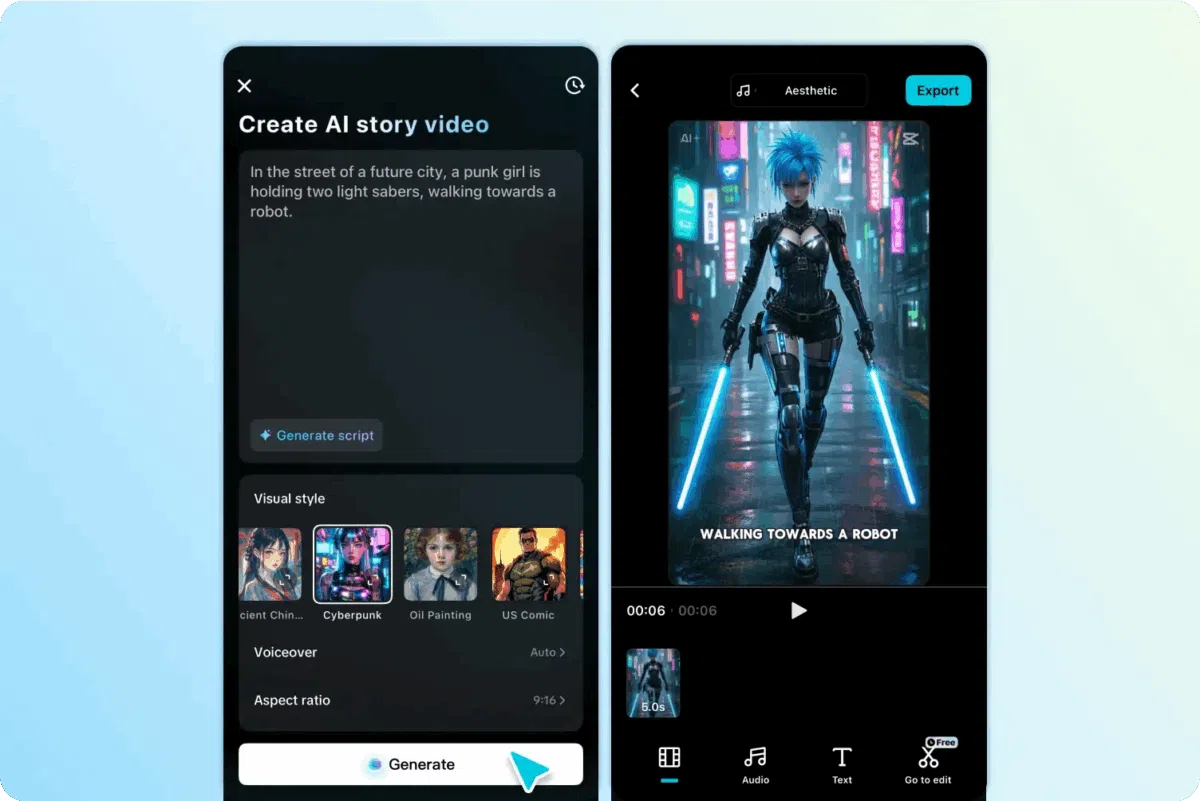
Step 1: Launch CapCut app and choose desired template Begin by opening the CapCut app and tapping the “AI Lab” tab from the bottom menu. You’ll find the “AI story maker” tool designed for easy storytelling. Browse templates such as “Create story video”, “Create with AI avatar”, and “Create video with scripts”. Choose the one that fits how you want to showcase your daily routine.

Step 2: Create and edit your video After selecting a template, hit the “Try AI workflow” button. Enter your idea under “creating a video story about” and select a visual look—maybe “Realistic film” for everyday realism or “Cartoon 3D” for a playful twist. Once ready, tap “Generate” to create your video.

CapCut will generate your daily routine video in seconds. After it’s done, tap “Music” to add the right vibe. Use the “Caption style” tab to add animated, readable captions. To do more—like applying filters or inserting transitions—tap “Go to Edit” and unlock CapCut’s full editing toolkit.
Step 3: Export and share your creation When your video captures your day perfectly, hit “Export” in the top-right corner. Your file will be saved to your device, making it easy to post on platforms like Facebook, TikTok, or YouTube.

Conclusion
The rise of routine videos proves that everyday moments hold creative power. Thanks to tools like the CapCut App, turning those moments into art is now simple. AI has made video creation accessible and enjoyable. You no longer need expensive gear or editing skills. You just need a phone, a bit of time, and a story to share. Daily life, once ordinary, becomes content that resonates and inspires.
This content was produced independently from the Worldcrunch editorial team.